I am SO TIRED of getting pinged by headhunters with NO IDEA of what it takes to be a good CRM consultant trying to put people on projects for junior rates. This morning I got pinged by someone looking for a SENIOR lead for a CRM v4->2011 upgrade project, and they wanted to pay $50/hr! I made that on my first job right out of school!
To be a successful CRM consultant a person must have skills in:
Windows Server
Active Directory
SQL Server
Exchange (and other mail servers)
IIS
Web and Network protocols
Firewalls and Security
Microsoft .NET and software development
Client side products such as IE, Office, etc.
As well as soft skills in business analysis and design, application architecture, project management, communication, project documentation, etc.
Further, with the current trend of the “consumerization of IT”, you also need to know a lot about the competing platforms such as Apple, Linux, etc., and of course the entire range of mobile devices that people might want to connect to their IT network and CRM.
If you a CRM consultant and have expertise and actual project experience in all these subject areas, as I do, then PLEASE DO NOT work for $50/hr! If you do you might think you’re being competitive by cutting your rate, but really all you’re doing is diluting the rates for all of us and marginalizing your skills and experience. If you cannot sell your services for a decent rate, then please go find a job in another industry. I have worked far too long and hard on my skills and experiences to not be fairly compensated. In thinking of a fair rate for yourself, note that a Microsoft Partner will likely charge between $150-$200/hr for a senior CRM consultant.
Oh and by-the-way, passing certification exams DOES NOT make you a CRM consultant. The exams are sets of questions that can be easily studied for, and in no way prepare a consultant for complex real-world project implementations. The only way to prepare for projects is to actually work on several projects and face the myriad variables that will be inevitable in different businesses and IT environments.
If you’re a customer implementing CRM or considering an implementation, or a head hunter looking to staff a CRM project, PLEASE take the time to educate yourself as to the skill set a good CRM consultant needs to have (send me a note and I’ll be happy to help you). Ask meaningful interview questions, a question like “When working with plugins how does parent pipeline mode differ from child pipeline mode” is meaningless and can be looked up in the SDK in a second. A better question is to ask “Tell me about a challenge you faced on one of your projects where you were forced to use plugins, and how did you implement the plugins to successfully meet the project deliverable?”
The key here, fellow CRM consultants, is not cutting your rates, but providing real VALUE for the rates you do charge. I have seen many projects fail when a customer brings in the cheapest rate they can find, and they end up spending far more money in the long run to bring in a truly experience consultant to fix the project.
Remember:
If you think it's expensive to hire a professional to do the job, wait until you hire an amateur!! - Red Adair
Wednesday, December 21, 2011


Wednesday, October 12, 2011
Windows 8 Metro CRM Contacts App
Hi all:
Just playing around with the Windows 8 Developer Preview and decided to try to create a Metro App to display CRM Contacts. I know Metro Apps are meant more for consumers rather than LOB, but as Social Networks and Business Networks continue to converge Apps like this will become more relevant. The GUI needs some work but here is a screen of the App in action (Contact info hidden):

Just playing around with the Windows 8 Developer Preview and decided to try to create a Metro App to display CRM Contacts. I know Metro Apps are meant more for consumers rather than LOB, but as Social Networks and Business Networks continue to converge Apps like this will become more relevant. The GUI needs some work but here is a screen of the App in action (Contact info hidden):

Saturday, March 26, 2011
A new challenge!
No, not CRM 2011, I decided to take on a physical challenge! After years of doing the same routines for weights and cardio, I wanted to make some major changes. So I cancelled my membership at my Gym, bought a Hoist V-Core home gym, and embarked on the P90X journey.
I am now at Day 20, going into recovery week, and after that I start with doubles! So far I have found the program to be very well designed and some of the workouts, like YogaX, are things I have never done and are kicking my butt. Here are some pictures of my new setup
http://thestraumanns.mine.nu/home/p90x.html
and yes that is Windows 7 Media Center being used to play the videos. I am also updating my progress on Twitter, follow me at @johnstraumann. Who knows there might even be a CRM post in there sometime!
I am now at Day 20, going into recovery week, and after that I start with doubles! So far I have found the program to be very well designed and some of the workouts, like YogaX, are things I have never done and are kicking my butt. Here are some pictures of my new setup
http://thestraumanns.mine.nu/home/p90x.html
and yes that is Windows 7 Media Center being used to play the videos. I am also updating my progress on Twitter, follow me at @johnstraumann. Who knows there might even be a CRM post in there sometime!
Wednesday, February 03, 2010
My skills
Hi all:
I haven't posted anything in a while so I thought "Why not a bit of self-promotion!" :)
Here is a list of some of my skills and experiences, as well as some products and add-ons for Dynamics CRM I have available:
- Experience with Cocoa, Mac OSX, iPod/iPhone application development
- Experience with Computer Asscoiates ITCM
- Experience with InstallShield 2010
- 7 years experience with Microsoft CRM
- Skilled in all areas of Dynamics CRM including: practice building/management, pre-sales architecture presentations, strategic business process analysis, Dynamics CRM implmentations including any required customizations.
- 7 years experience with Java/Notes/Linux
- 8 years experience with Microsoft technologies
- 10 years experience pre-sales engineering
- excellent communications skills
- excellent presentation skills
CRM ISV Solutions available for sale
Modules
- Financial Services Accelerator
-Professional Services Accelerator
- Staffing Accelerator
- Municipal Accelerator
- RFP Management Accelerator
Web Portals, Add-Ons and Plugins
- Outlook group mailing list addon
- Outlook “auto contact” addon
- contract auto-renewal plugin
- Auto-numbering plugin
- Web lead
- Service portal
- extended views
- extended views Excel Export
- SharePoint integrations
- Custom Dashboards
.NET/General Programming Experience
•Experience with Agile Scrum software development
•Extensive experience with Dynamics CRM since v1
•Experience in all facets of CRM projects including pre-salessolutions architecture, business process design, andconfigurations and customizations.
•Custom Outlook plugins
•Integration to Microsoft platform products such as SharePoint
•Integration to 3rd party applications
•Portal development
•Utility development
•Workflow/plugins development
•Integration with Java/J2EE applications
•Custom Dashboards
I haven't posted anything in a while so I thought "Why not a bit of self-promotion!" :)
Here is a list of some of my skills and experiences, as well as some products and add-ons for Dynamics CRM I have available:
- Experience with Cocoa, Mac OSX, iPod/iPhone application development
- Experience with Computer Asscoiates ITCM
- Experience with InstallShield 2010
- 7 years experience with Microsoft CRM
- Skilled in all areas of Dynamics CRM including: practice building/management, pre-sales architecture presentations, strategic business process analysis, Dynamics CRM implmentations including any required customizations.
- 7 years experience with Java/Notes/Linux
- 8 years experience with Microsoft technologies
- 10 years experience pre-sales engineering
- excellent communications skills
- excellent presentation skills
CRM ISV Solutions available for sale
Modules
- Financial Services Accelerator
-Professional Services Accelerator
- Staffing Accelerator
- Municipal Accelerator
- RFP Management Accelerator
Web Portals, Add-Ons and Plugins
- Outlook group mailing list addon
- Outlook “auto contact” addon
- contract auto-renewal plugin
- Auto-numbering plugin
- Web lead
- Service portal
- extended views
- extended views Excel Export
- SharePoint integrations
- Custom Dashboards
.NET/General Programming Experience
•Experience with Agile Scrum software development
•Extensive experience with Dynamics CRM since v1
•Experience in all facets of CRM projects including pre-salessolutions architecture, business process design, andconfigurations and customizations.
•Custom Outlook plugins
•Integration to Microsoft platform products such as SharePoint
•Integration to 3rd party applications
•Portal development
•Utility development
•Workflow/plugins development
•Integration with Java/J2EE applications
•Custom Dashboards
Thursday, November 19, 2009
External Team Emails in Outlook
A customer of mine is using the Events Management Accelerator, and wanted an easy way to create an Outlook email to the External team Members for a Campaign. So we developed a little utility in Outlook to enable this functionality:
We added a toolbar in Outlook:

and clicking the button shows a form which displays the current Campaigns

and then clicking a campaign loads all the External Team Members for that campaign

Clicking a name in the Team Members list adds it to the Email list, or clicking the "Add all" button adds all the team members to the email lsit

Clicking the Email button creates a new Outlook email with the To field populated with the Team Members.

Tuesday, September 15, 2009
Accounts Gadget for Windows 7
Hi all:
Here is a link to my CRM Accounts gadget for Windows 7....
http://thestraumanns.mine.nu/win7_accounts_gadget.zip
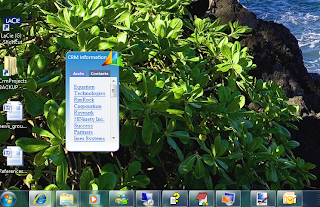
Please note if you download the gadget, in the files Accountsv4 and Contactsv4 the references to my server and CRM org must be changed to yours...
Here is a link to the CodeProject article
http://www.codeproject.com/KB/gadgets/DynamicsCRMGadget.aspx
Here is a link to my CRM Accounts gadget for Windows 7....
http://thestraumanns.mine.nu/win7_accounts_gadget.zip

Please note if you download the gadget, in the files Accountsv4 and Contactsv4 the references to my server and CRM org must be changed to yours...
Here is a link to the CodeProject article
http://www.codeproject.com/KB/gadgets/DynamicsCRMGadget.aspx
Thursday, September 10, 2009
XRM Accelerator 2 - Financials
Hi all:
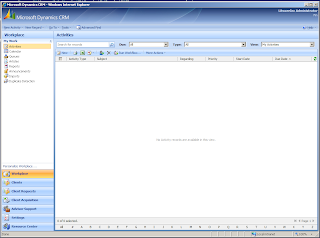
Here is a screen for another XRM accelerator, this one is for financial services. This XRM package can aid your deployment of CRM if your business is in the financial services market.
A click-through PPT demo can be found on my SkyDrive:
http://cid-c986ac6b4918eaed.skydrive.live.com/browse.aspx/XRM
If you would like more information please contact us at john@straumanngroup.com. Cheers.
Cheers,
John.
Here is a screen for another XRM accelerator, this one is for financial services. This XRM package can aid your deployment of CRM if your business is in the financial services market.

A click-through PPT demo can be found on my SkyDrive:
http://cid-c986ac6b4918eaed.skydrive.live.com/browse.aspx/XRM
If you would like more information please contact us at john@straumanngroup.com. Cheers.
Cheers,
John.
Subscribe to:
Posts (Atom)


